
NTSL
TMChart uses NTSL, a scripting language widely used by Brazilian traders, for three things:
- Indicators: paint candles (
PaintBar) and draw plots, lines and texts on the chart. - Strategies: scripts with order functions (
BuyAtMarket,SellShortLimit…). They run in the Backtest and in Automations; on the chart, orders are ignored (nothing goes to MT5). - Optimization: tests many combinations of a strategy’s parameters.
The full list of what the editor accepts is in the NTSL function reference.
Strategy Editor
Section titled “Strategy Editor”Open it from the Strategies → Strategy Editor menu. The NTSL tab holds NTSL scripts; the MQL5 tab, MQL5 programs.
Open scripts sit in tabs at the top (click a script in the My strategies list to open it; × closes the tab, + creates a new script). Right below is the toolbar:
- File: New script, Import (.tmscript/.tmauto), Delete, Export, Save, Save as… (stores a copy under another name; the original stays as it was saved) and, in the author edition, Package .tmauto.
- Edit: Check (compiles without saving).
- Run: Backtest of the saved strategy.
- Click New script (or +) and paste or type the code.
- Click Check: errors show in the Compile menu, below the code, with line and column. Save stores the script (the chart always uses the saved version). A tab with unsaved changes shows • in its name; each tab keeps its changes until you save or close it.
- In the list, each script shows its type: ind. (indicator), strat. (strategy) or error (does not compile).
- Indicators are added to the chart with the Indicators button on the toolbar. In Plots you choose whether they show over the price or in its own pane; Closed candle only avoids recalculating on every trade.
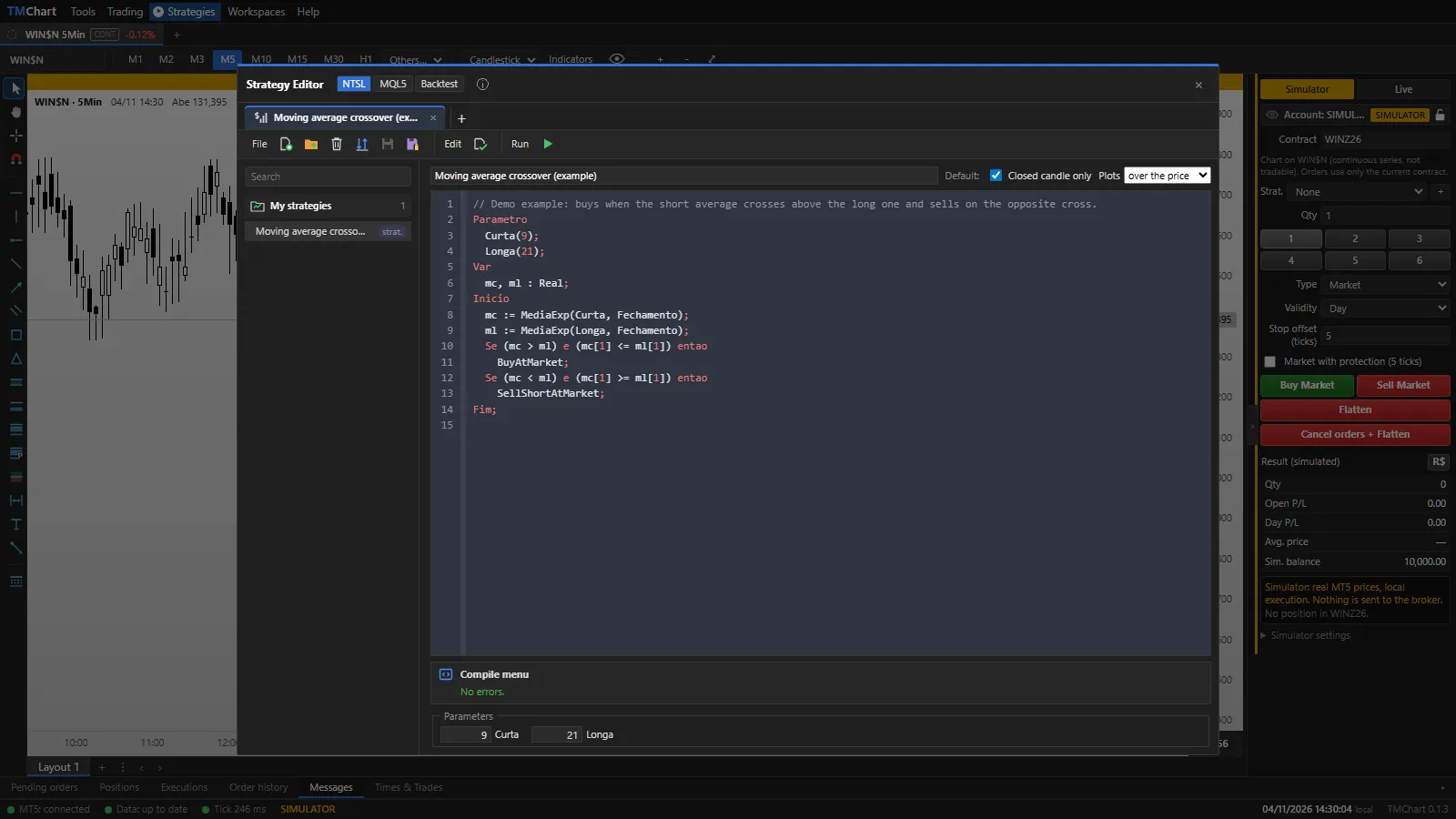 App screenshot with fictitious data (demo).
Script structure
Section titled “Script structure”Input Period(20);Var m : Real;Begin m := Media(Period, Close); If Close > m then PaintBar(clGreen) else PaintBar(clRed); Plot(m);End;- Input: parameters with a default value, editable on each chart, in the Backtest and in automations.
- Const and Var: constants and variables. Types:
Real,Integer,BooleanandString. - Begin … End: the body, run once per bar, from the oldest to the most recent.
- Keywords work in Portuguese or English (
Se/If,entao/then,Inicio/Begin…). Case does not matter.
Series and previous bars
Section titled “Series and previous bars”Close,Open,High,Low,Volumeare series:Close[1]is the previous bar close.- A variable used with
[n]anywhere becomes a series and keeps the value of each bar. - An indicator without enough bars returns “undefined”: any comparison with it is false. Division by zero gives 0.
Strategy example
Section titled “Strategy example”Input Fast(9); Slow(21);Var f, s : Real;Begin f := MediaExp(Fast, Close); s := MediaExp(Slow, Close); If (f > s) and (f[1] <= s[1]) then BuyAtMarket; If (f < s) and (f[1] >= s[1]) then SellShortAtMarket;End;A cross up buys; a cross down sells. With a long position, the sell only flattens (it does not reverse); to reverse, use
ReversePosition. Test it in the Backtest before using it in an automation.
Your own functions and procedures
Section titled “Your own functions and procedures”Declare them before Begin with Function Name(a : Real) : Real; (or Procedure). They only see their own
parameters and local variables: global variables are rejected.
Export and import
Section titled “Export and import”In the editor, Export saves the script to a .tmscript file:
- Open: whoever imports it sees and edits the code.
- Closed: compiled and encrypted code. Whoever imports it can use it, adjust the parameters and optimize, but cannot see the code or the console. You can set the author and an expiry date.
Import adds the scripts from a .tmscript or .tmauto file.
Import/Export Strategies (several at once)
Section titled “Import/Export Strategies (several at once)”Strategies → Import/Export Strategies menu:
- Import: choose the file (
.tmscriptor.tmauto), move the strategies from Available to Selected (buttons>and>>; back with<and<<) and click Import. The strategies come in disabled. - Export: move the strategies to Selected and click Export. With Export source code ticked the file is open (whoever imports it sees and edits the code); unticked, it is closed. Closed strategies can only be exported closed.
Differences from the NTSL manual
Section titled “Differences from the NTSL manual”- There is no
Caso/Case. - Functions that depend on data MT5 does not provide (aggression, data by broker, PTAX…) or on unpublished formulas are rejected with the reason — see the list at the end of the reference.
- Book and symbol: only the chart’s own symbol.